

Chirp with its own users, posts that point at their authors, and a feed of the people you follow.
Chirp's posts table holds each author's handle beside the post's words.
So Ada's handle, ada, is stored four times: once in each of her posts.
If Ada changed it, all four copies would have to change.
And Chirp can't say who follows whom: a person isn't a row anywhere.
So how does Chirp keep each person once, and know who follows whom?
The way Simplified does: a users table, posts that hold their author's id, and a join table.
In this checkpoint you rebuild Chirp's tables that way, and then its pages on top of them.
Chirp's new tables need the names posts and users.
Your project already has both: your posts, and the practice users table from your first project.
Chirp needs its own users table, so both go.
In Supabase's SQL Editor, paste these two lines, and press Run.
DROP TABLE posts;
DROP TABLE users;
DROP TABLE deletes a whole table: its rows and its schema. A later lesson, on keeping data safe, comes back to it.
Supabase may warn you that the query deletes something. Go ahead, as these tables are meant to go.
Then reload localhost:3000.
You should see
In the Table Editor, no tables. Chirp's home page shows an error like Could not find the table 'public.posts'.
users holds one row for each person on Chirp.
| Column | Type | Rules |
|---|---|---|
| id | integer | The primary key, generated by Postgres |
| handle | text | Never NULL |
| name | varchar(50) | Can be empty |
| created_at | timestamp | Never NULL, and starts at now() |
posts holds one row for each post, with its author's id instead of a handle.
| Column | Type | Rules |
|---|---|---|
| id | integer | The primary key, generated by Postgres |
| user_id | integer | Never NULL, and a foreign key to the id of users |
| body | varchar(280) | Never NULL |
| likes | integer | Never NULL, and starts at 0 |
| created_at | timestamp | Never NULL, and starts at now() |
One person follows many people, and one person has many followers.
So follows is a join table: one row for each pair, and no id of its own.
| Column | Type | Rules |
|---|---|---|
| follower_id | integer | Never NULL, and a foreign key to the id of users: the person who follows |
| followee_id | integer | Never NULL, and a foreign key to the id of users: the person they follow |
Run each CREATE TABLE in the SQL Editor, users first. If Supabase asks about RLS, pick Run and enable RLS.
Your turn 1
Write the CREATE TABLE query for users, and run it.
Success. No rows returned under the editor.
CREATE TABLE users (
  id         integer PRIMARY KEY GENERATED ALWAYS AS IDENTITY,
  handle     text NOT NULL,
  name       varchar(50),
  created_at timestamp NOT NULL DEFAULT now()
);
Your turn 2
Write the CREATE TABLE query for posts, with user_id pointing at users, and run it.
Success. No rows returned under the editor.
CREATE TABLE posts (
  id         integer PRIMARY KEY GENERATED ALWAYS AS IDENTITY,
  user_id    integer NOT NULL REFERENCES users (id),
  body       varchar(280) NOT NULL,
  likes      integer NOT NULL DEFAULT 0,
  created_at timestamp NOT NULL DEFAULT now()
);
Your turn 3
Write the CREATE TABLE query for follows, and run it.
Success. No rows returned under the editor.
CREATE TABLE follows (
  follower_id integer NOT NULL REFERENCES users (id),
  followee_id integer NOT NULL REFERENCES users (id)
);
You should see
In the Table Editor, three tables, users, posts and follows, each with no rows.
Paste this into the SQL Editor, and press Run once.
INSERT INTO users (handle, name, created_at) VALUES
  ('ada', 'Ada', '2026-10-20 09:00'),
  ('ben', 'Ben', '2026-10-21 10:00'),
  ('cy',  'Cy',  '2026-10-22 11:00'),
  ('dee', 'Dee', '2026-10-23 12:00'),
  ('eli', 'Eli', '2026-10-24 13:00'),
  ('fay', 'Fay', '2026-10-25 14:00'),
  ('you', 'You', '2026-10-26 15:00');

INSERT INTO posts (user_id, body, likes, created_at) VALUES
  (1, 'Day 1 of learning SQL. SELECT star feels like a superpower.', 42, '2026-11-01 09:15'),
  (2, 'Why did nobody tell me about flexbox sooner?', 87, '2026-11-01 14:22'),
  (3, 'Hello, world.', 5, '2026-11-02 07:50'),
  (4, 'Centering a div on the first try. Screenshot it.', 311, '2026-11-02 19:05'),
  (5, 'Semicolons: optional in JS, required in my heart.', 73, '2026-11-03 11:11'),
  (1, 'Shipped my first Next.js page today.', 118, '2026-11-03 18:40'),
  (2, 'Reading the docs is a skill. I am leveling up.', 16, '2026-11-04 10:10'),
  (4, 'React state finally clicked for me.', 96, '2026-11-04 20:48'),
  (6, 'First pull request merged!', 189, '2026-11-05 09:40'),
  (3, 'Git commit, git push, deep breath.', 29, '2026-11-05 16:16'),
  (1, 'Tailwind makes me feel like a designer.', 250, '2026-11-06 12:05'),
  (6, 'Naming things is the hardest part.', 47, '2026-11-06 18:18'),
  (4, 'Sql joins are next on my list.', 58, '2026-11-07 09:27'),
  (2, 'my sql query finally returned the right rows', 64, '2026-11-07 21:30'),
  (5, 'Pair programming with a friend beats tutorials.', 22, '2026-11-08 15:35'),
  (3, 'Dark mode is not a feature. It is a lifestyle.', 204, '2026-11-08 22:11'),
  (1, 'Coffee, then code. In that order.', 31, '2026-11-09 08:02'),
  (6, 'Refactored it. Same behavior, half the code.', 12, '2026-11-09 20:55'),
  (2, 'TypeScript caught three bugs before lunch.', 173, '2026-11-10 13:45'),
  (4, 'Deployed. It works on more than my machine.', 142, '2026-11-10 17:20');

INSERT INTO follows (follower_id, followee_id) VALUES
  (7, 1), (7, 4), (7, 6),
  (1, 2), (2, 1), (3, 4), (4, 1), (5, 3), (6, 1);
The users go in first, because each post's user_id must match an id that's already in users.
They are the same 20 posts as before, with ada's id, 1, where ada's handle was.
And you are user 7, who follows ada, dee and fay.
Then reload localhost:3000.
You should see
In the Table Editor: users with 7 rows, posts with 20 and follows with 9. Chirp's home page shows an error that posts has no column handle.
The feed still asks posts for a handle, and posts no longer has one.
The handle is in users, so the feed needs a JOIN.
SELECT posts.id, posts.body, posts.likes, posts.created_at, users.handle
FROM posts
JOIN users ON posts.user_id = users.id
ORDER BY posts.created_at DESC
LIMIT 10;
With Supabase's library, the join is the table's name inside the select:
| SQL you know | Supabase's library |
|---|---|
users.handle … JOIN users ON posts.user_id = users.id | .select("…, users(handle)") |
WHERE user_id IN (1, 4, 6) | .in("user_id", [1, 4, 6]) |
WHERE follower_id = 7 AND followee_id = 2 | .eq("follower_id", 7).eq("followee_id", 2) |
You never write the ON. Supabase reads it from your foreign key, REFERENCES users (id).
Replace getPosts() with this.
export async function getPosts() {
  const { data, error } = await supabase
    .from("posts")
    .select("id, body, likes, created_at, users(handle)")
    .order("created_at", { ascending: false })
    .limit(10);
  if (error) throw new Error(error.message);
  return data;
}
Each post comes back with its author inside it: { id: 20, body: "Deployed. …", users: { handle: "dee" } }.
So in components/PostCard.tsx, change post.handle to post.users.handle.
You should see
Ten posts again, with Dee's "Deployed. It works on more than my machine." first, and dee above it.
Every other function in lib/data.ts still reads or writes a handle column in posts.
Most need one change: users(handle) in the select, or user_id in place of handle.
Two more places read a post's handle: the post page's Edit check, and components/MostActive.tsx. Change both to users.handle.
Your turn 1
Make getUsers() return every user's id and handle, in id order, for the Switch user menu in the sidebar.
Switch user lists seven people, from ada to you.
// SELECT id, handle FROM users ORDER BY id;
export async function getUsers() {
  const { data, error } = await supabase
    .from("users")
    .select("id, handle")
    .order("id");
  if (error) throw new Error(error.message);
  return data;
}
Your turn 2
Write getUserId(handle): the id of the user with that handle, or null.
Then make the profile's three functions look that id up, and pick the posts whose user_id matches it.
localhost:3000/ada says 4 posts · 441 likes, with "Coffee, then code. In that order." first.
localhost:3000/you says 0 posts, and localhost:3000/nobody says User not found.
// SELECT id FROM users WHERE handle = 'ada';
export async function getUserId(handle: string) {
  const { data, error } = await supabase
    .from("users")
    .select("id")
    .eq("handle", handle)
    .maybeSingle();
  if (error) throw new Error(error.message);
  return data?.id ?? null;
}

// SELECT posts.id, posts.body, posts.likes, posts.created_at, users.handle
// FROM posts JOIN users ON posts.user_id = users.id
// WHERE posts.user_id = 1 ORDER BY posts.created_at DESC;
export async function getPostsBy(handle: string) {
  const userId = await getUserId(handle);
  if (userId === null) return [];
  const { data, error } = await supabase
    .from("posts")
    .select("id, body, likes, created_at, users(handle)")
    .eq("user_id", userId)
    .order("created_at", { ascending: false });
  if (error) throw new Error(error.message);
  return data;
}

// SELECT COUNT(*) FROM posts WHERE user_id = 1;
export async function countPostsBy(handle: string) {
  const userId = await getUserId(handle);
  if (userId === null) return 0;
  const { count, error } = await supabase
    .from("posts")
    .select("*", { count: "exact", head: true })
    .eq("user_id", userId);
  if (error) throw new Error(error.message);
  return count ?? 0;
}

// SELECT SUM(likes) FROM posts WHERE user_id = 1;
export async function getLikesTotal(handle: string) {
  const userId = await getUserId(handle);
  if (userId === null) return 0;
  const { data, error } = await supabase
    .from("posts")
    .select("likes.sum()")
    .eq("user_id", userId)
    .single();
  if (error) throw new Error(error.message);
  return data.sum ?? 0;
}
Your turn 3
Move the rest: getPost(), searchPosts(), getTrending() and getMostActive() read each author's handle from users.
And createPost() saves the signed-in user's id, which getMe() now returns as id.
Searching SQL finds Ben's, Dee's and Ada's posts. Trending runs from Dee's 311 likes down to Ben's 173.
Most active lists ada 4, ben 4, cy 3, dee 4, eli 2 and fay 3, in any order.
Writing Chirp has real people now. lands on localhost:3000/post/21, by you.
Then delete it, so your feed shows the same 20 posts as everyone else's from here on.
// SELECT posts.id, posts.body, posts.likes, posts.created_at, users.handle
// FROM posts JOIN users ON posts.user_id = users.id WHERE posts.id = 20;
export async function getPost(id: number) {
  const { data, error } = await supabase
    .from("posts")
    .select("id, body, likes, created_at, users(handle)")
    .eq("id", id)
    .maybeSingle();
  if (error) throw new Error(error.message);
  return data;
}

// SELECT posts.id, posts.body, posts.likes, posts.created_at, users.handle
// FROM posts JOIN users ON posts.user_id = users.id
// WHERE posts.body ILIKE '%sql%' ORDER BY posts.created_at DESC;
export async function searchPosts(q: string) {
  const { data, error } = await supabase
    .from("posts")
    .select("id, body, likes, created_at, users(handle)")
    .ilike("body", `%${q}%`)
    .order("created_at", { ascending: false });
  if (error) throw new Error(error.message);
  return data;
}

// SELECT posts.id, posts.body, posts.likes, users.handle
// FROM posts JOIN users ON posts.user_id = users.id
// ORDER BY posts.likes DESC LIMIT 5;
export async function getTrending() {
  const { data, error } = await supabase
    .from("posts")
    .select("id, body, likes, users(handle)")
    .order("likes", { ascending: false })
    .limit(5);
  if (error) throw new Error(error.message);
  return data;
}

// SELECT users.handle, COUNT(*)
// FROM posts JOIN users ON posts.user_id = users.id
// GROUP BY users.handle;
export async function getMostActive() {
  const { data, error } = await supabase
    .from("posts")
    .select("count(), users(handle)");
  if (error) throw new Error(error.message);
  return data;
}

// INSERT INTO posts (user_id, body) VALUES (7, 'Chirp has real people now.') RETURNING id;
export async function createPost(body: string) {
  const me = await getMe();
  const { data, error } = await supabase
    .from("posts")
    .insert({ user_id: me.id, body })
    .select("id")
    .single();
  if (error) throw new Error(error.message);
  return data.id;
}
You should see
Every page of Chirp loads with no error. editPost() and deletePost() needed no change, because their WHERE is on the post's id.
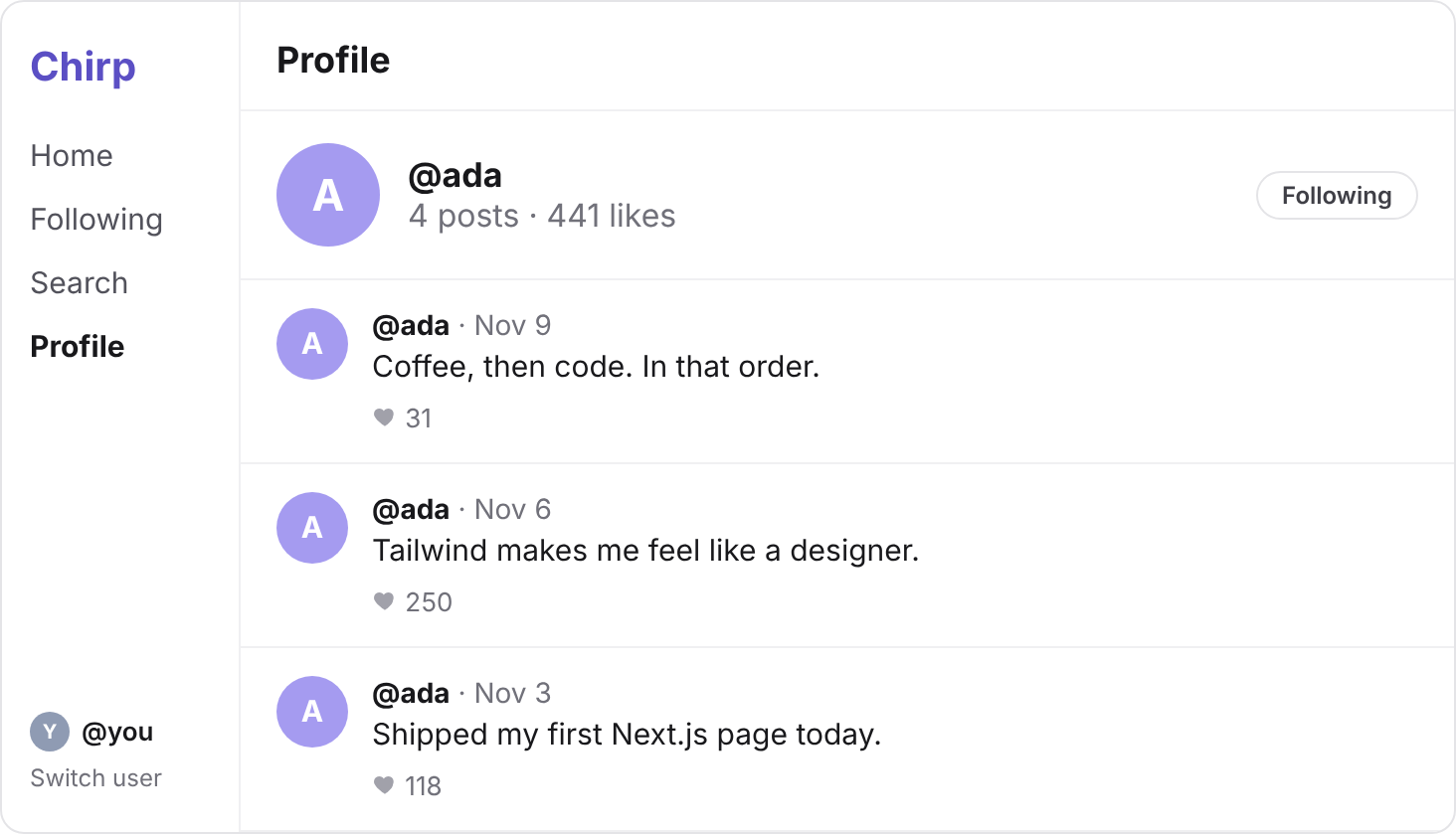
A profile shows Follow, or Following if you already follow that person.
The button calls three functions, which still return sample data. Each takes the id of the person on the profile.
Your turn 1
Make follow(userId) save that you follow that person, and unfollow(userId) remove it.
On localhost:3000/ben, pressing Follow adds a row to follows, 7 and 2. Pressing it again takes that row out.
// INSERT INTO follows (follower_id, followee_id) VALUES (7, 2);
export async function follow(userId: number) {
  const me = await getMe();
  const { error } = await supabase
    .from("follows")
    .insert({ follower_id: me.id, followee_id: userId });
  if (error) throw new Error(error.message);
}

// DELETE FROM follows WHERE follower_id = 7 AND followee_id = 2;
export async function unfollow(userId: number) {
  const me = await getMe();
  const { error } = await supabase
    .from("follows")
    .delete()
    .eq("follower_id", me.id)
    .eq("followee_id", userId);
  if (error) throw new Error(error.message);
}
Your turn 2
Make isFollowing(userId) say whether you follow that person, from a count Postgres makes.
Ada's profile says Following, and Ben's says Follow.
// SELECT COUNT(*) FROM follows WHERE follower_id = 7 AND followee_id = 1;
export async function isFollowing(userId: number) {
  const me = await getMe();
  const { count, error } = await supabase
    .from("follows")
    .select("*", { count: "exact", head: true })
    .eq("follower_id", me.id)
    .eq("followee_id", userId);
  if (error) throw new Error(error.message);
  return (count ?? 0) > 0;
}
You should see
Follow Ben: his button says Following, and follows has 10 rows. Unfollow him: Follow again, and 9 rows.
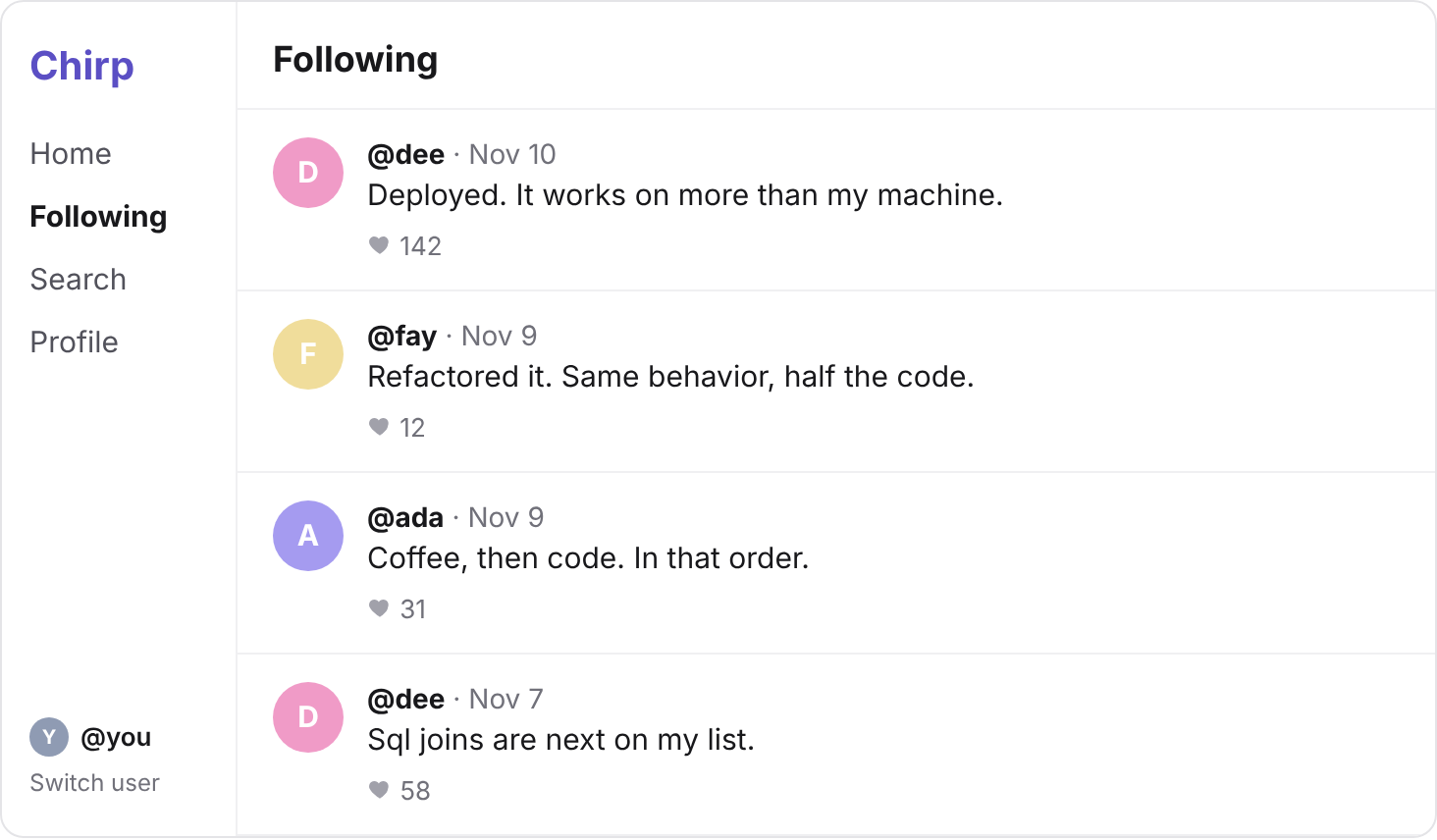
localhost:3000/following shows posts by the people you follow. It calls getFollowingFeed(), which still returns sample data.
This one takes two queries: first the ids of the people you follow, then their posts.
Your turn 1
Make getFollowingFeed() return every post by the people you follow, newest first, each with its author's handle.
localhost:3000/following lists 11 posts by ada, dee and fay, from Dee's "Deployed" down to Ada's "Day 1 of learning SQL".
Follow Ben, and it lists 15, with his "TypeScript caught three bugs before lunch." second.
// SELECT followee_id FROM follows WHERE follower_id = 7;
// SELECT posts.id, posts.body, posts.likes, posts.created_at, users.handle
// FROM posts JOIN users ON posts.user_id = users.id
// WHERE posts.user_id IN (1, 4, 6) ORDER BY posts.created_at DESC;
export async function getFollowingFeed() {
  const me = await getMe();
  const { data: follows, error: followsError } = await supabase
    .from("follows")
    .select("followee_id")
    .eq("follower_id", me.id);
  if (followsError) throw new Error(followsError.message);

  const ids = follows.map((row) => row.followee_id);
  const { data, error } = await supabase
    .from("posts")
    .select("id, body, likes, created_at, users(handle)")
    .in("user_id", ids)
    .order("created_at", { ascending: false });
  if (error) throw new Error(error.message);
  return data;
}
You should see
Use Switch user to become ben: his Following shows Ada's four posts, as ben follows only ada.
Switch back to you, and unfollow Ben, so follows holds its 9 rows again.
Commit your changes, and push them to GitHub.
git add -A
git commit -m "Users, follows and the Following feed"
git push
You should see
Your commit on GitHub, with the new lib/data.ts in it.
Creating posts says relation "users" does not exist
posts points at users, so users must exist first. Run the CREATE TABLE for users, then the one for posts.
Every post card shows no handle, or an error about handle
The handle now arrives inside users. Read post.users.handle, not post.handle.
Writing a post says column "handle" of relation "posts" does not exist
createPost() still saves a handle. Save user_id: me.id instead.
An error that says Use of aggregate functions is not allowed
Checkpoint 2's two lines haven't run in this project. Run them in the SQL Editor again.
Following shows posts by everyone
The posts query has no .in("user_id", ids), so nothing picks the rows. Add it before .order(…).
Following someone says violates foreign key constraint "follows_followee_id_fkey"
That id matches no row in users. Pass the id from getUserId(handle), not a handle or a made-up number.
My tables have twice as many rows
Step 3's query ran twice. Do step 1 again, adding DROP TABLE follows; as its first line, then steps 2 and 3.
Supabase says your project is paused
Free projects pause after a week with no activity. Press Restore project on its page, and wait a few minutes.
Something is wrong, and you can't tell where
Run the SQL from the solution's first lines in the SQL Editor. If its rows are right there, the bug is in your code.
Tick every step once you've seen what it says you should see. Then mark the project complete to unlock the next lesson.